App for journalists: Tailor, for stitching your iPhone's screenshots together
This free iOS app will turn your series of images into a single, seamless picture for sharing on social media
– 2 min read


This free iOS app will turn your series of images into a single, seamless picture for sharing on social media
This article was migrated from an old version of our website in 2025. As a result, it might have some low-quality images or non-functioning links - if there's any issues you'd like to see fixed, get in touch with us at info@journalism.co.uk.
What is it? An app for stitching multiple images together, for easy sharing on social media.
Devices: iOS
Cost: Free
How is it of help to journalists?
People often head to social media to share snippets of interesting, thought-provoking and even shocking articles or comment threads they've read, and there are many tools available to help them do this, such as Excerpt, Liner and OneShot.
But sometimes it is quicker to take a screenshot by just simultaneously pressing the power and home button. This image can then be shared with your followers, while you put the link to the original article in the text of your post.
But what if what you want to share won't fit in a single screenshot? Many journalists have been known to tweetstorm, posting picture after picture in succession, but this can get messy and confusing for readers to follow.
Tailor, a free app available for iOS devices, enables journalists to stitch images together to form one tall picture.
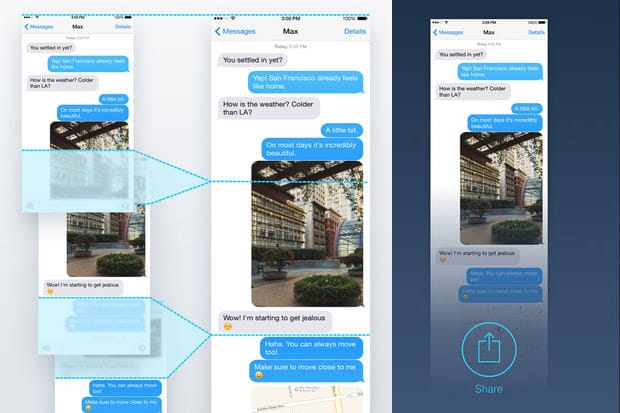
Once you've found a snippet of an article you want to share, simply take your screenshots, making sure they overlap a little bit, and open the app and give it permission to access your camera roll.
It will automatically stitch together the most recent series of overlapping screenshots in your camera roll. Note that you can't stitch photos together if they don't overlap.
Simply tap the 'export' icon, and retrieve the stitched PNG image to share on social. It will have a watermark at the bottom, which can be removed by upgrading for £2.99.