App for journalists: Telegram, for encrypted messaging
Send chat messages more securely with this app featuring self-destructing messages and heavy encryption
– 3 min read


Send chat messages more securely with this app featuring self-destructing messages and heavy encryption

This article was migrated from an old version of our website in 2025. As a result, it might have some low-quality images or non-functioning links - if there's any issues you'd like to see fixed, get in touch with us at info@journalism.co.uk.
Chat app for secure messaging
iPhone, iPad, Android, Windows Phone, desktop (PC, Mac and Linux)
Free
Chat apps are increasingly being used to source news and disseminate reports, from international broadcasters covering natural disasters to
local news outlets reporting football scores
.
For example, the BBC used WhatsApp in its coverage of 2013's Typhoon Haiyan and, more recently, the Indian general elections .
However, some privacy experts have raised questions over the security of messaging apps due to the fact that it is often not clear what methods are used to encrypt information.
This is obviously a cause for concern for any journalists who wish to use chat apps to connect with sources for investigative or any other potentially sensitive work.
At first glance, Telegram looks similar to other messaging apps currently available. Its key difference lies in its security features, which include self-destructing messages and heavy encryption.
In fact, the app is so confident of its ability to protect messages from hackers it is offering $300,000 to anyone who successfully manages to decrypt its information.
Telegram is also cloud-based, unlike WhatsApp, meaning users can sync contacts and conversations across different devices, and is available as a desktop service – another one-up on WhatsApp.
Launched in 2013, Telegram claims it will never feature ads and is supported financially by Russian technology entrepreneur Pavel Durov .
It has also publicly released its API , source code and protocol for scrutiny from its users, and to enable developers to build new Telegram apps.
To use Telegram, download the app to your device and type in your phone number. The app will then SMS you a code you can use to confirm your number.
You can then add some profile information (name and photo). The name field is mandatory but once you've set-up Telegram you have the option to create a public username, which allows you to chat with people without them seeing your real name or telephone number. More on that later.
You'll then get a pop-up asking for Telegram's permission to access your contacts. According to the pop-up, these contacts will be stored in the cloud and "heavily encrypted".
To send a message via Telegram, click the pencil icon in the top left corner. Here you will see contacts who are already using Telegram as well as your usual phone contacts, if you've allowed Telegram access to them.
You can use Telegram for standard messaging or, if an extra layer of security is required, choose 'new secret chat', which uses "end-to-end encryption" and cannot be forwarded to other users.
Bear in mind that secret chats are only carried on one device, so if you start a secret conversation via iPhone you won't be able to continue it on your Mac, for example.
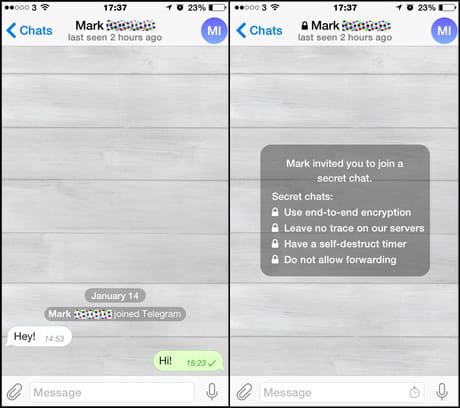
Example of standard Telegram chat (left) and secret chat (right). Screengrab from the Telegram app
Users can also set messages to self-destruct within a certain time limit once it has been opened by the recipient, from one second to one week. The self-destruct feature can also be applied to attachments such as photos, videos and documents, location data and any audio sent via the app.
Other messaging options are 'groups' and 'broadcasts', which enable users to send a message to up to 100 contacts at the same time. Contacts within a group who receive the same message will be able to see each other; contacts within a broadcast list will not.
To set your public username, tap the 'settings' cog in the bottom right corner and scroll down to 'username'. Enabling this will allow other people to find you via your specified username without knowing your phone number.
The privacy and security settings also offer additional useful features including the option to hide when you were 'last seen' on the app, log out remotely, block certain users and delete your account and associated data if you do not log in for a certain period of time.