App for journalists: Picjoy, for organising your photos
The free app that autotags your images for instant access on the go
– 2 min read


The free app that autotags your images for instant access on the go
This article was migrated from an old version of our website in 2025. As a result, it might have some low-quality images or non-functioning links - if there's any issues you'd like to see fixed, get in touch with us at info@journalism.co.uk.
An automated photo organiser for your phone or tablet
iOS - but soon to be available for Android
Free
Picjoy acts as an intelligent photo library that automatically organises images on your devices, letting users search and find their photographs within seconds. The app uses an image's metadata – date, time, location etc – so users can search for their desired picture with relevant prompts, automatically sorting them by category such as the season or time of day.
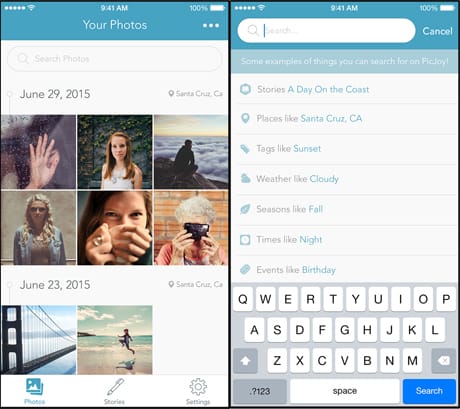
Image courtesy of Picjoy.
Had multiple visits to one location for a story? Picjoy should group them all together using GPS metadata. If you'd like to personalise Picjoy's searchability, you can also tag your photographs with your own search terms, such as 'editorial meeting', 'protest story' or maybe 'dessert recipes'.
The app also lets you create 'Stories', which allow you to give your photos a title and description while keeping your favourite images together in a single spot. Although the app is only currently available on iOS devices, support for Google Drive, Amazon Photos, Android devices and Dropbox are coming soon.
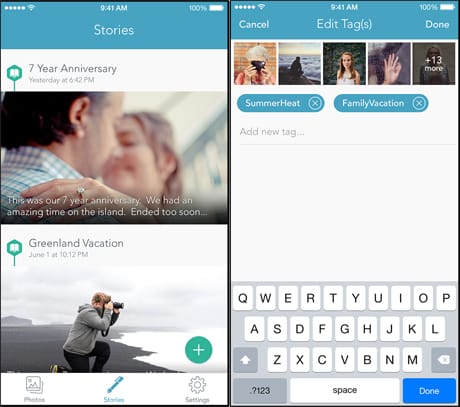
Image courtesy of Picjoy.
Once users have downloaded the app and given Picjoy access to their device's camera roll, the application will immediately categorise the images on that device. Then you're all set up to go!
Users can share and upload pictures or stories at the click of a button, and easily delete images for a clear and organised workspace.
As everything is in one place, your iCloud and camera roll images will be immediately available for use, and searching for photos will be simple – whether they were taken years or minutes ago. Perfect when you don't have time to scroll through your endless images of pets, selfies and screenshots before finding pics from a recent story. What's more, the app is easy to navigate and keeps your images to a high quality without compressing them.
Although we found the app to be a little buggy, crashing on occasion, the premise is excellent and could be a gamechanger for anyone who takes a lot of photos and needs to access them quickly and easily.
There used to be something here that couldn't be migrated - please contact us at info@journalism.co.uk if you'd like to see this updated!