App for journalists: CloudMagic, your private search engine
CloudMagic allows you to search your various personal accounts, including Dropbox, Gmail, Google Drive, Twitter and Evernote

– 2 min read


CloudMagic allows you to search your various personal accounts, including Dropbox, Gmail, Google Drive, Twitter and Evernote
This article was migrated from an old version of our website in 2025. As a result, it might have some low-quality images or non-functioning links - if there's any issues you'd like to see fixed, get in touch with us at info@journalism.co.uk.
iPhone / iPad / Android / Windows / Windows 8 / Kindle Fire .
You can also search via the CloudMagic site and there are browser extensions for Safari, Chrome, Firefox and Internet Explorer
Free (for up to 50 searches a month)
CloudMagic allows you to search your personal files and messages, including Dropbox, Gmail, Facebook, Evernote, Twitter and Google Drive
Journalists are power users of cloud services, such as Twitter, Gmail, Dropbox, Evernote or Google Drive, and are often inundated with information.
A search tool such as CloudMagic saves you time by allowing you to enter a keyword and search across your social media accounts, emails and files.
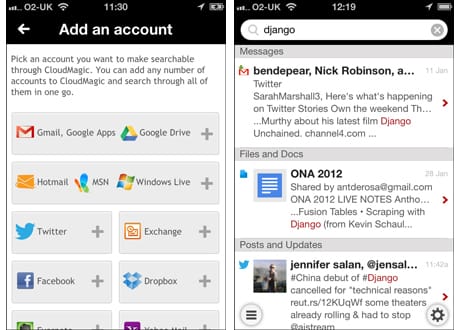
In the example below I entered the term 'Django' and found results of the word being used in a Google Doc, on Twitter and on Facebook.

You can sign up for CloudMagic via the website or via one of the apps and then authorise your various accounts and start searching.
Supported platforms include Gmail, Hotmail, Yahoo, Dropbox, Evernote, Twitter and Facebook.
An alternative to CloudMagic is Cue (which used to be called Greplin and a previous app of the week ). One advantage to Cue is that you can search LinkedIn. This can be really useful if you are searching for someone's phone number, which you may have in an email, Dropbox document, Google Doc or LinkedIn. Cue also allows you to link Delicious and Pinboard (both part of the premium service).