App for journalists: Workflow, for optimising everyday tasks
This automation app turns multiple actions into a single, smooth process

– 2 min read


This automation app turns multiple actions into a single, smooth process

This article was migrated from an old version of our website in 2025. As a result, it might have some low-quality images or non-functioning links - if there's any issues you'd like to see fixed, get in touch with us at info@journalism.co.uk.
What is it? A powerful automation app that allows users to perform multiple processes in one action.
Cost: Free
Devices: iOS
How is it of use to journalists?
Journalists can make use of Workflow and its array of built-in sequences to process a number tasks on-the-go or tailor their own workflows for custom-made chains of command.
These workflows are assigned to the widget board or found in the Safari options, so users have a quick go-to option for the common tasks they run into every day.
Sure, there are some handy quotidian options inside the app such as teeth timers, caffeine logs and pizza dial-ups. However, the savvy journalist can make use of its processing power to shorten URLs, set deadline reminders, zip and e-mail files and even create your own gifs and memes — if that is your thing.
It couples well with other apps too. Here is the pick of the bunch:
With Bear: users can dictate notes straight into the app, then upload them into e-mail, forward onto Whattsapp or copy to your Google Drive or Dropbox.
With Pocket: users can stockpile articles into the app to read later and then pull up any amount when they have the opportunity to 'kick back'.
With social media: Users can jump onto trending Twitter stories, Medium’s ‘editor’s picked’ or ‘top hunts’ on Product Hunt.

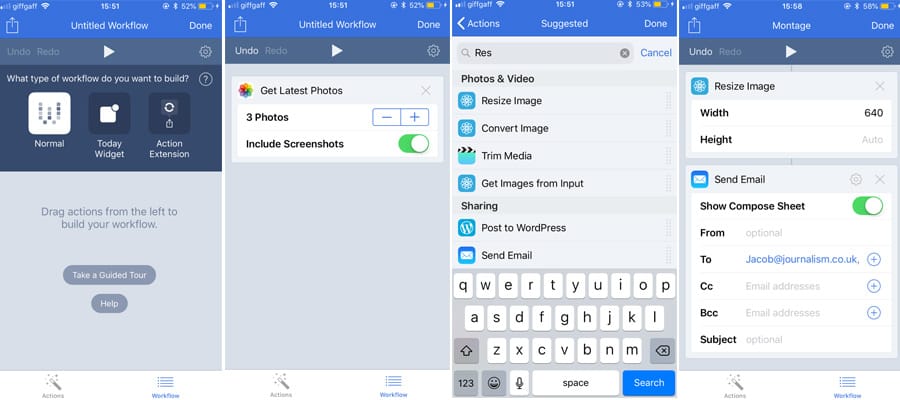
If you are a bit more creative, you can edit these built-in processes or start building your own workflows. Mind, this can be a bit daunting at first. This is a simple demonstration of resizing your last four pictures and e-mailing them to yourself.
But the possibilities are almost endless, so give it a go yourself.
Show us your workflows @journalismnews