Tool for journalists: Embedplus, for customising YouTube
This tool lets you add scene markers, custom start/stop times, annotations and other features to YouTube videos
– 2 min read


This tool lets you add scene markers, custom start/stop times, annotations and other features to YouTube videos
This article was migrated from an old version of our website in 2025. As a result, it might have some low-quality images or non-functioning links - if there's any issues you'd like to see fixed, get in touch with us at info@journalism.co.uk.
There used to be something here that couldn't be migrated - please contact us at info@journalism.co.uk if you'd like to see this updated!
Embedplus is an easy-to-use platform that offers some good extra features to enhance YouTube videos.
Embedplus would be useful for journalists working either with their own videos or with social and user-generated content.
Simply paste a YouTube link to your chosen video into Embedplus to get started. From there you can adjust the size, add a custom start/stop time and add annotations to hone in on any details you want to highlight.
You can also add scene markers to allow viewers to skip to the most important parts of a longer video.
The platform will then generate an embed code. For Wordpress users, there is also a free plugin that will open up the Embedplus editing options within your site.
Another benefit for Wordpress users is that Embedplus automatically adds SEO mark-up for Google, Bing and Yahoo to allow pages that feature video a greater chance of showing up in search engine results, even if you aren't the video owner.
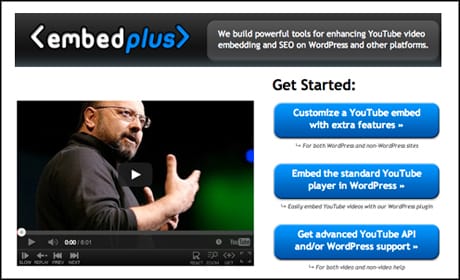
Embedplus allows users to easily customise YouTube videos
On the front end of your site, the Embedplus player features a slow-motion option and moveable zoom to allow users to get a closer look at something, which is great for raw footage or sports videos.
The 'react' button also highlights discussions about the video on social communities, including Google+, YouTube and Reddit. Twitter integration is currently under construction.
There is also a replay button to allow you to view an event again immediately after it happens. You can double-click to loop the replay or triple-click to loop the whole video.
Embedplus is free, although there is also a pro version available from $14.99 (£9.10) with extra features including analytics, support for external links in annotations, and notifications if YouTube happens to delete one of your videos.